
Download Artisan DVD/DivX Player – Basic DVD Player, DivX Support, Free Video Playback
Overview
Artisan DVD/DivX Player is a lightweight video playback application designed to meet the needs of users seeking a straightforward solution for playing DVDs and DivX-formatted video files. The app focuses on core functionality, offering essential tools for viewing disc-based media and digital video files without the complexity of advanced features. It is particularly suited for individuals who require minimal setup and a no-frills interface to access their video content.
Target users include casual viewers, users with older media collections, and those operating on budget-constrained systems where resource-heavy players are impractical. The software addresses the common challenge of playing legacy video formats without relying on multiple third-party applications. By supporting both physical DVDs and DivX files, it provides a unified playback experience for diverse media sources.
Developed by Artisan Software, the app has been available since 2005, indicating its longevity and stability within the niche of basic video playback tools. Although the developer did not provide additional technical details, the app's continued presence suggests consistent functionality across generations of Windows operating systems. It fills a specific gap in the media player ecosystem by offering a simple, free alternative for users who do not need advanced features like video editing, streaming, or customizable playback settings.
Real-world use cases include watching home-recorded DVDs, playing DivX-encoded films downloaded from older sources, and accessing video content on systems with limited resources. While it may not be suitable for multimedia enthusiasts or power users, it serves a practical purpose for users who value simplicity and reliability over aesthetics or extended functionality.
Key Features & Functionality
- Basic DVD Playback – The app allows users to load and play DVDs directly from optical drives, supporting standard DVD navigation such as chapter selection, play/pause, and stop controls. This enables users to watch full-length films without requiring additional software.
- DivX File Compatibility – Artisan DVD/DivX Player supports DivX-encoded video files, allowing playback of compressed digital movies without conversion. This is especially useful for users with large video libraries stored in this format.
- Subtitle and Language Management – The software includes functionality to switch between available subtitles and audio tracks on DVDs, enabling users to view content in their preferred language or with closed captions.
- Minimalist Interface – Designed with simplicity in mind, the app avoids clutter by presenting only essential playback controls. This reduces user learning curves and supports efficient operation for non-technical users.
- Lightweight Resource Usage – With a file size of just 12.5 MB, the app consumes minimal system resources, making it suitable for older or low-spec computers where performance is a concern.
For example, a user with a collection of DivX-encoded movies from the early 2000s can play these files directly without converting them. Similarly, someone with a DVD of a family event can navigate chapters and switch between audio tracks seamlessly. The lack of advanced features like video capture or bookmarking means the app is not intended for editing or long-term viewing sessions, but rather for immediate playback of existing media.
Interface, UX & Performance
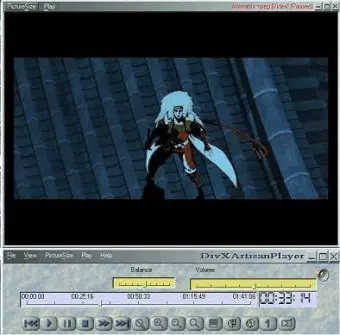
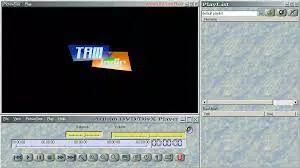
The user interface of Artisan DVD/DivX Player is described as simple and somewhat amateurish, reflecting a design philosophy that prioritizes function over form. The layout features basic playback buttons, a progress bar, and minimal on-screen controls, all arranged in a straightforward manner. While this may lack the polish of modern media players, it ensures that essential functions are accessible without confusion.
Navigating the app is intuitive for users familiar with standard DVD playback tools. The menu system is linear, with options for disc loading, audio and subtitle selection, and playback control. There are no complex settings or customization layers, which contributes to a consistent user experience across different systems.
Although the developer did not list formal performance metrics, the app’s small file size of 12.5 MB suggests efficient resource utilization. It is expected to run smoothly on older Windows systems, though specific performance on modern hardware or mobile platforms was not disclosed. Responsiveness during playback appears adequate for standard definition content, but users may experience limitations with high-resolution or high-bitrate files if the system lacks sufficient decoding power.
Stability is assumed based on the app’s long-standing presence since 2005, but no formal reports on crashes or bugs were provided. Users should expect consistent playback for basic media files, though the absence of error logging or crash reporting tools limits troubleshooting capabilities.
Platform Compatibility & Technical Requirements
Artisan DVD/DivX Player is designed for the Windows operating system. The software version is 1.0, with a file size of 12.5 MB. It is available at no cost, making it accessible to users seeking a free video playback solution.
The developer did not specify minimum OS requirements or compatibility with newer Windows versions. As such, users should exercise caution when installing on systems running Windows 10 or later, as the app may not be fully optimized for modern architectures or security protocols. Compatibility with 64-bit systems was not confirmed.
Specific hardware requirements, such as GPU support or processor speed, were not listed. Given its lightweight nature, it is likely to function on older hardware, but users are advised to test the app on their system before relying on it for critical playback tasks.
Pros and Cons
Pros
- Free to download and use, making it accessible for budget-conscious users.
- Supports both DVD and DivX file playback in a single application.
- Minimal system requirements allow operation on older or low-spec computers.
- Simple interface reduces learning curve for non-technical users.
- Stable performance for basic video playback tasks.
Cons
- Interface is described as amateurish and lacks modern design elements.
- Missing advanced features such as video bookmarking, screenshot capture, or playlist management.
- Compatibility with modern Windows versions is uncertain due to lack of official support.
- No official update history or developer support channels available.
- Performance with high-resolution or high-bitrate video files may be limited.
FAQ
Is Artisan DVD/DivX Player safe to download?
The app is available as a free download, but users should ensure they obtain it from trusted sources to avoid bundled software or malware. Always scan downloaded files with up-to-date antivirus software before installation.
Can I use Artisan DVD/DivX Player on Windows 10 or Windows 11?
While the app was released in 2005, its compatibility with Windows 10 or 11 is not officially confirmed. Users may encounter issues due to outdated system requirements or lack of digital signatures. Testing on a virtual machine or secondary device is recommended.
Does the app support 4K or HD video playback?
There is no information indicating support for 4K or high-definition video formats. The app is best suited for standard definition content and may not decode high-bitrate files efficiently.
Is Artisan DVD/DivX Player available for Android or iOS?
The app is designed exclusively for Windows. No mobile versions have been released, and the developer did not provide information about future platform expansion.
How do I update Artisan DVD/DivX Player?
As of now, there is no official update mechanism or version history available. The current version is 1.0, and no newer releases have been announced. Users are advised to manually check the developer’s website for updates.
Final Thoughts
Artisan DVD/DivX Player remains a niche tool for users who need a no-frills, free solution for playing DVDs and DivX files on Windows. Its simplicity and lightweight design make it a viable option for older systems or users with minimal multimedia needs. While it lacks modern features and may not be compatible with newer operating systems, it continues to serve its intended purpose effectively for basic playback.
For those seeking a secure, straightforward way to access legacy video content without installing heavy software, this app offers a practical alternative. However, users requiring advanced functionality or long-term support should consider more actively maintained freeware players.
Download Artisan DVD/DivX Player now


